Unity template case study

Unity 6 Top-Down Game Starter Kit

A reusable Unity template for faster 2D top-down game development, built around complete game flow, reusable systems, and developer experience.

A practical foundation for starting small top-down games without rebuilding the same setup every time.

Engine Unity 6.4
Template Universal 2D
Role Design + Implementation

Overview

A ready-made foundation for small top-down Unity games.

This project is a reusable 2D top-down game starter kit built in Unity 6.4. The goal was to reduce the repetitive setup work that often happens at the start of small game projects: scene flow, player movement, menus, pause handling, health, scoring, audio, settings, and basic gameplay objects.

The kit includes a working example scene, CC0 assets, UI screens, audio support, saved settings, scene transitions, reusable prefabs, documentation, a public repository, and a Windows build.

Unity starter kit gameplay scene with player, enemy, pickup, hazard, HUD, and CC0 art
Gameplay screenshot with HUD and CC0 art

Project goals

Useful immediately, simple enough to understand, clean enough to publish.

Reduce setup time

Handle common boilerplate so development can begin with gameplay and theme-specific content.

Stay approachable

Keep the code readable and understandable for solo developers or small teams.

Support a full loop

Provide menu, gameplay, pause, win, lose, restart, and return-to-menu flow.

Prepare for release

Include structure, documentation, license, GitHub release, and a Windows build.

Problem & result

Games often lose early momentum to repeated setup tasks.

Before and after comparison from empty Unity scene to playable starter scene
The desert of Empty

Many projects need the same fundamentals: menu, scene loading, player movement, HUD, pause, game over, victory, pickups, hazards, audio, settings, and fast testability. Individually these are small systems, but together they can consume a large part of the early development window.

The finished starter kit provides a complete mini-game foundation with persistent managers, direct scene testing, menus, state-driven UI, health, score, timer, pickups, hazards, a chaser enemy, audio, saved settings, CC0 assets, documentation, and a release build.

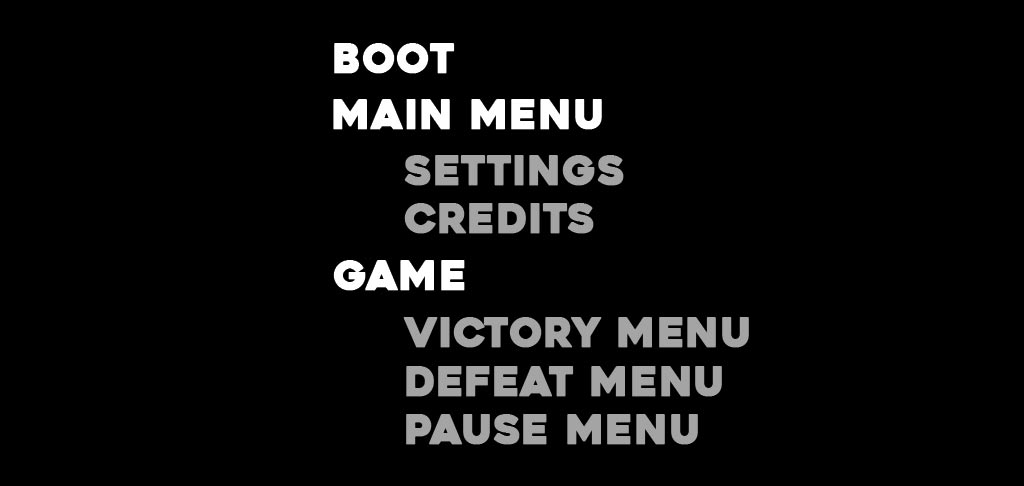
Scene flow

Boot, menu, and game scenes with a clear play loop.

  • 00_Boot initializes the persistent Core object.
  • 01_MainMenu contains Start Game, Settings, Credits, Quit, and menu music.
  • 02_Game demonstrates movement, camera follow, HUD, pause, timer, pickups, hazard, enemy, victory, and game over.
Scene flow diagram from boot to main menu to game states
Scene flow diagram

Core architecture

A simple state-driven structure keeps UI and gameplay predictable.

The main game states are Booting, MainMenu, Playing, Paused, GameOver, and Victory. These states are managed by GameManager.

Iteration flow

UI systems listen to GameManager.OnGameStateChanged instead of polling every frame. This makes the UI cleaner and easier to reason about.

Development usability

The Bootstrapper supports direct scene testing.

Normal build flow

The project starts from 00_Boot, which creates the persistent core managers.

Iteration flow

The Bootstrapper lets the developer press Play directly from 02_Game by creating core systems when needed.

Gameplay systems

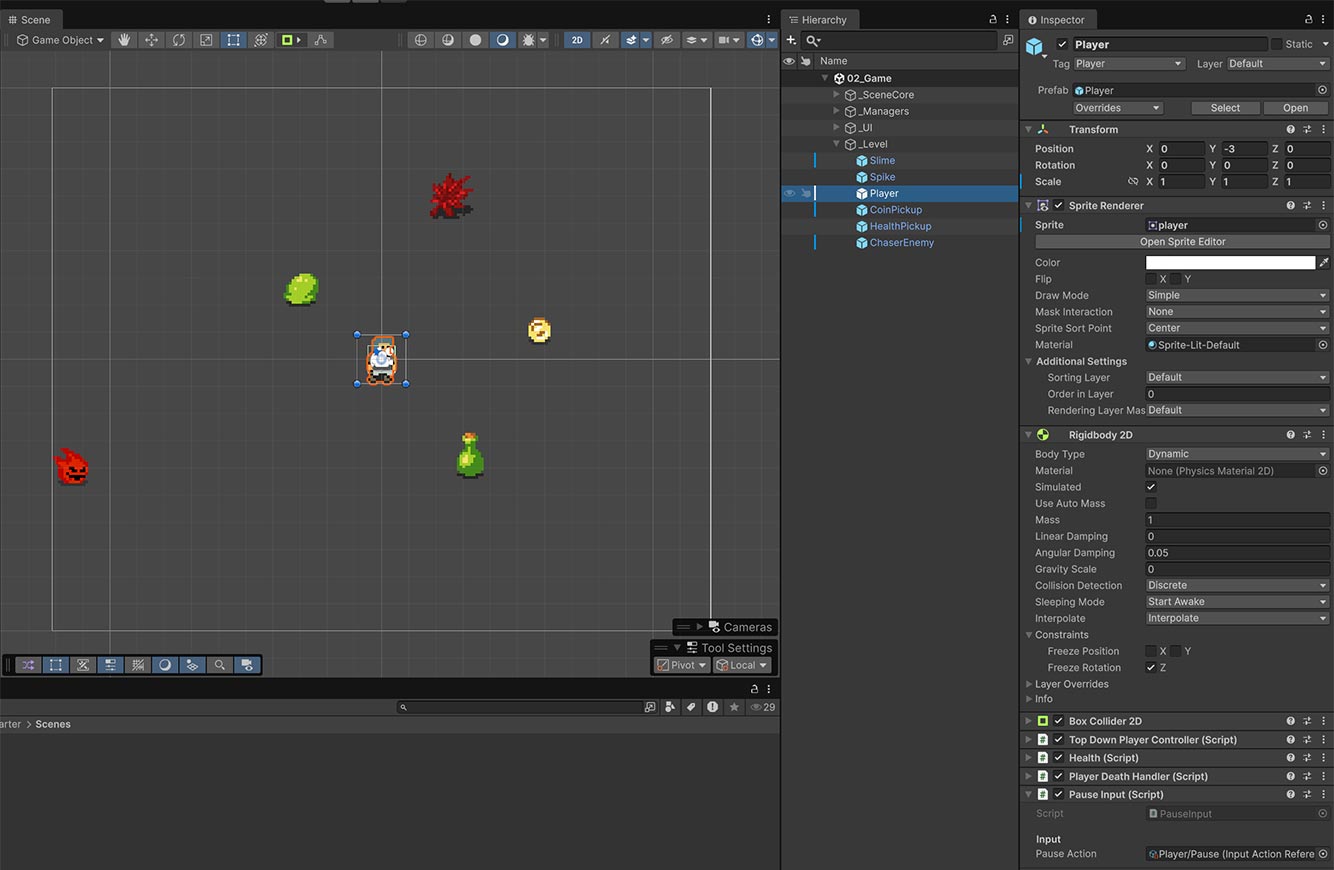
Reusable components for movement, health, hazards, pickups, enemies, and timers.

Player prefab inspector showing Rigidbody2D, Collider2D, Health, movement, and pause components
Reusable components

UI & audio

State-driven screens, saved audio settings, and lightweight transitions.

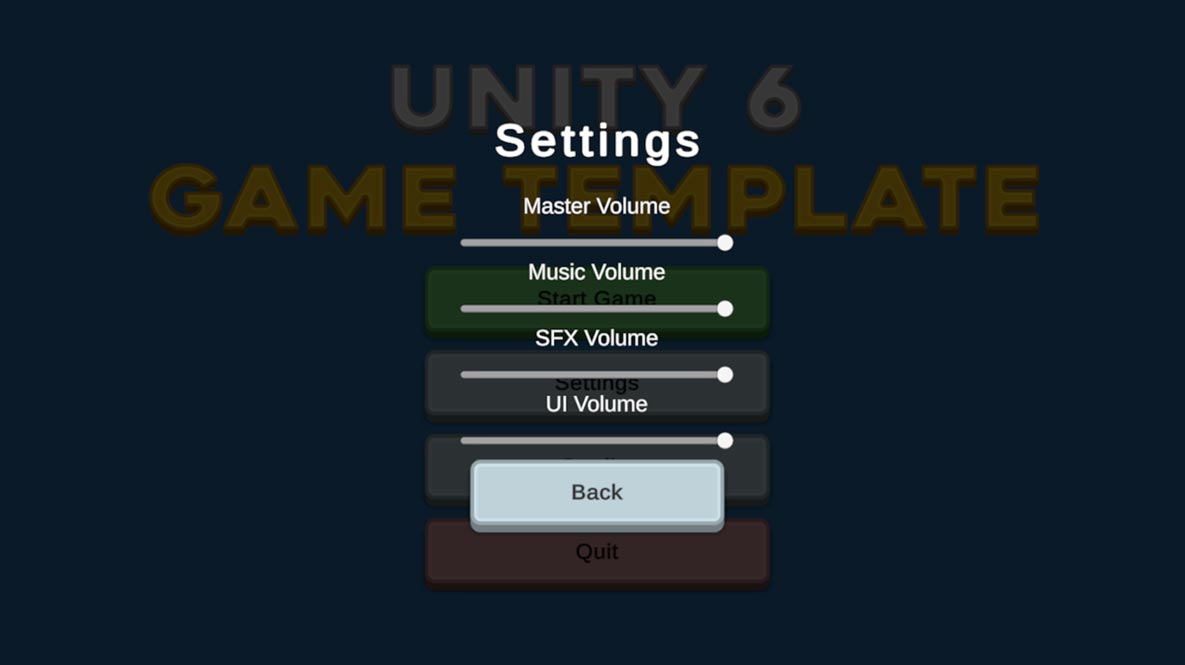
The kit includes Main Menu, Settings, Credits, HUD, Pause, Game Over, and Victory. The settings menu includes sliders for Master, Music, SFX, and UI volume, with sample sounds when sliders are released.

Audio is handled by a persistent AudioManager, while scene-specific music is handled by SceneMusic. Settings are saved only when leaving the Settings menu or resetting values.

Screenshot collage of main menu, settings, gameplay, pause, victory, and game over
Ready to use settings menu

Project organization

A clean folder and hierarchy structure for public release.

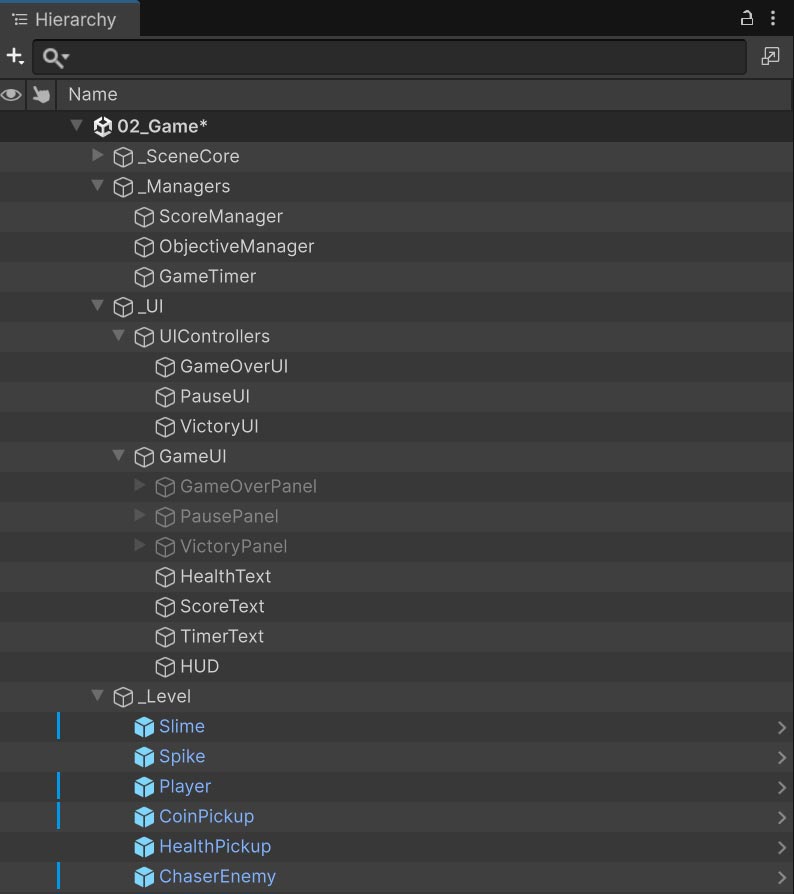
Organized Unity Project window and scene hierarchy
Add visual here: organized Unity hierarchy and/or Project window. Replace unitystarterkit-assets/project-organization.jpg.

The starter kit is contained under Assets/_TopDownStarter/, with assets organized by type: Art, Audio, Materials, Prefabs, Scenes, Scripts, ScriptableObjects, and Settings.

Scripts are divided into Audio, Camera, Core, Gameplay, Player, UI, and Utilities. The game scene hierarchy is grouped into readable sections: _SceneCore, _Managers, _UI, _Level, and _Gameplay.

Development process

Incremental system work kept the project stable.

Foundation

Project structure, boot scene, persistent core, GameManager, scene loading, and main menu.

Game loop

Movement, input, camera follow, health, pause, game over, pickups, HUD, hazards, timer, chaser enemy, and victory state.

Release

Audio, settings, scene transitions, CC0 art, documentation, fresh clone testing, GitHub release, and Windows build.

Challenges & solutions

Small usability problems shaped the final architecture.

Direct scene testing

A Bootstrapper creates the Core prefab when needed and sets the correct state for the current scene.

Camera jitter

Rigidbody2D interpolation smoothed the player position between physics updates.

UI state updates

GameManager events replaced frame-by-frame polling for Pause, Game Over, and Victory UI.

Settings saves

Volume changes update live, but PlayerPrefs saves happen only when leaving Settings or resetting audio.

AI-assisted development note

AI was used as a development assistant, not an autonomous creator.

I used generative AI for planning, code iteration, debugging, and documentation. Implementation decisions, Unity setup, testing, project structure, visual organization, release preparation, and publishing were handled manually.

The workflow helped me move quickly while still requiring active technical judgment, testing, and decision-making throughout the project.

Summary

A practical reusable template for quickly starting small 2D top-down games.